How to Design Secure IoT Connectivity for Networked Access Control Systems
A networked access control system is only as secure as the path used to identify devices, deliver permissions, issue unlock commands, and record events. Connecting door controllers, smart locks, biometric readers, turnstiles, and parcel lockers to a management platform is not enough. The design must prevent an untrusted device from joining the system, stop commands from being altered in transit, preserve safe operation during an outage, and make remote maintenance possible without creating a permanent back door.
That is the practical meaning of IoT security connectivity in physical security: a controlled, verifiable connection between field hardware and the services that manage it. The strongest designs do not rely on one control such as encrypted Wi-Fi or a firewall rule. They combine device identity, network segmentation, encrypted communications, permission boundaries, resilient local behavior, and a disciplined lifecycle process.
Start with the security decision, not the wireless protocol
A common design mistake is to select Wi-Fi, Ethernet, cellular, Bluetooth, or a low-power radio network before defining what each device must do when communications are slow, unavailable, or compromised. A door at a staff entrance, a vehicle gate, a turnstile, and a smart parcel locker can all be “connected,” but their operational and safety requirements differ substantially.
Build the connectivity design around the decisions each endpoint is allowed to make. A reader may capture a credential and send a request. A controller may decide whether to unlock a door using locally stored rules. A cloud platform may manage schedules, audit trails, and remote configuration. These roles should not be interchangeable. In particular, an Internet-connected reader or lock should not receive unrestricted authority to change site-wide access policy simply because it can reach the same platform.
Before choosing products or network paths, document four questions for every endpoint:
- What information does it send: credentials, biometric templates, health status, video-related metadata, door position, alarm inputs, or delivery records?
- What commands can it receive: unlock, lockdown, firmware update, credential synchronization, time adjustment, or configuration changes?
- What must still function locally if the upstream connection fails?
- What happens if the endpoint is tampered with, stolen, reset, or replaced?
This exercise exposes an important distinction: connectivity is not merely a transport layer. It defines which failures can become access failures and which compromise paths can reach physical assets.
Use a layered architecture with clear trust boundaries
For most commercial deployments, the safest architecture separates field devices from business networks and separates site operations from Internet-facing services. The precise topology will vary, but the logic should remain consistent: devices receive only the network reachability they require, and no more.
Network segmentation is central to this model. Access control equipment should not share an unrestricted network segment with office workstations, guest Wi-Fi, printers, or consumer IoT devices. Segmentation does not make a weak device secure, but it limits lateral movement if that device is compromised. A compromised smart lock should not provide a route into financial systems, building administration, or sensitive video archives.
Segmentation can be implemented through dedicated network zones, firewall policies, separate switching infrastructure, or a combination of these controls. The method matters less than the outcome: the device network has explicitly defined communication paths, and those paths can be monitored and reviewed.
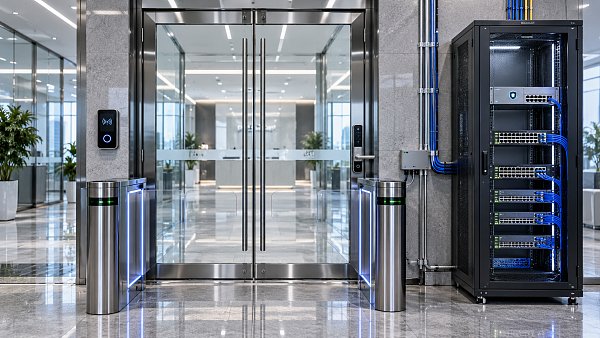
Where an access control site requires local continuity, place an on-premises controller or gateway between field devices and external services. This layer can validate credentials from a local cache, retain audit events until the connection returns, and prevent a brief cloud or WAN outage from becoming a building-wide access incident. It also reduces the need for every field device to maintain broad direct Internet access.
Give every device a verifiable identity
Passwords are a poor foundation for machine-to-machine trust. Shared installer credentials, default administrator accounts, and a single API key reused across a fleet make it difficult to determine which device is communicating and easy for one exposure to spread. Secure IoT connectivity begins with a unique identity for each controller, gateway, lock, or connected cabinet.
In a mature deployment, the management service authenticates the device and the device authenticates the service. This is commonly achieved with device certificates, protected cryptographic keys, or equivalent hardware-backed identity mechanisms. Mutual authentication is especially valuable for remote access systems because it reduces the risk of an endpoint accepting commands from a server that merely appears legitimate.
The identity process must also cover enrollment. A device should not become trusted because it appears on a network with an expected name or address. Provisioning should bind a specific physical or logical device identity to the correct site, tenant, and intended role. For example, a controller assigned to a loading dock should not be able to register itself as a controller for a restricted laboratory just because an installer connected it to the wrong network port.
Replacement is often overlooked. Define how credentials are revoked when a controller fails, a locker module is replaced, or a device is returned for repair. A secure onboarding process without a clean decommissioning process leaves former devices with valid identities and possible access to service endpoints.
Protect commands, credentials, and operational data differently
Encryption in transit is a baseline requirement, but it is not the entire data-protection strategy. The information moving through an access control environment has different consequences if exposed or altered. An unlock command, a biometric template, a door-forced-open event, and a firmware package should not all receive the same handling by default.
Commands that change physical access need integrity protection as well as confidentiality. The recipient must be able to confirm that a command came from an authorized system, has not been changed, and is current rather than replayed from an earlier capture. Time synchronization, command sequencing, nonces, or similar anti-replay controls are therefore part of secure command design, not minor implementation details.
Biometric systems require additional care. A fingerprint, face, or vein-recognition workflow may use a local matching model, a centralized matching service, or a hybrid design. The connectivity choice should follow the privacy, latency, resilience, and data-retention requirements of the deployment. Sending raw biometric data broadly across networks simply because it is technically possible creates unnecessary exposure. In many settings, keeping sensitive biometric processing or templates within controlled local boundaries is easier to defend than making every reader dependent on a remote service.
Event data also needs context. A stream of “door opened” records has limited security value when device clocks drift, device identities are weak, or administrator actions are missing from the audit trail. Logs should record meaningful changes: enrollment, credential changes, unlock commands, configuration updates, firmware actions, remote support access, and communication failures. The goal is not to collect every possible event. It is to preserve evidence that can explain an access decision or an unexpected change.
Choose connectivity based on operational constraints
There is no universally correct transport. Wired Ethernet is often appropriate for fixed controllers, turnstiles, and high-traffic entrances because it can provide predictable connectivity and can be managed within the building network. It may be less practical for retrofits, distributed gates, or temporary sites where cabling work is disruptive.
Wi-Fi can work well for devices located inside a managed facility, but it introduces roaming, radio coverage, credential management, and interference considerations. Do not treat a strong signal reading at installation as proof of long-term reliability. Reader position, metal doors, lift shafts, storage inventory, and later construction changes can affect radio behavior.
Cellular connectivity is useful for detached facilities, remote cabinets, construction entrances, and locker banks where no trusted local network exists. Its main advantage is independence from the customer LAN; its main design question is how devices authenticate, how usage is controlled, and what they do during coverage loss. A cellular connection should still terminate into a controlled service environment rather than expose a device management interface directly to the public Internet.
Bluetooth and other short-range technologies are often part of mobile credential workflows or local commissioning. They should be treated as proximity channels, not inherently trusted channels. Pairing, device discovery, relay resistance, authorization expiry, and lost-phone handling deserve design attention. Convenience features can quietly broaden the attack surface when their identity and revocation processes are weak.
Design for offline operation without weakening security
“Fail secure” and “fail safe” are not generic connectivity settings. They are physical security and life-safety decisions that must be made door by door, based on egress requirements, emergency procedures, lock hardware, and the function of the space. Network loss should not cause a system to behave unpredictably, and a remote policy should not override local safety requirements.
For many controlled entrances, the practical approach is local decision-making with bounded authority. Controllers can retain active credentials, time schedules, anti-passback state where applicable, and emergency rules for a defined operating period. When the network returns, events synchronize and centrally issued changes resume. The local cache must itself be protected: it should not allow an attacker with physical access to extract credentials, alter policies, or roll a device back to an older configuration.
Avoid designing for a permanent “offline exception.” If every device maintains an indefinitely valid local list and rarely reconnects, revocations and policy changes become unreliable. Offline capability should maintain business continuity during an outage, while normal connectivity keeps permissions, device posture, and audit records current.
Remote management must be more restricted than local operation
Remote firmware updates, diagnostics, and configuration changes reduce operational cost, particularly across multi-site access control and IoT locker networks. They also create a high-impact control plane. An attacker who gains broad firmware or configuration authority may affect thousands of doors, lockers, or access points at once.
Use signed firmware, controlled release groups, and rollback procedures that have been assessed against the device’s security posture. A failed update should not leave a controller permanently unreachable or force an unsafe unlock state. Staged deployment matters: update a small, representative group first, observe device health and access behavior, then expand. A firmware management process is incomplete if it does not define who can approve releases, who can initiate them, and how exceptions are handled.
Vendor support access requires similar discipline. Persistent remote desktop sessions, exposed web interfaces, and shared service accounts are difficult to justify in a high-consequence environment. Prefer time-limited, approved support sessions with individual authentication and audit records. The vendor should have access only to the systems needed for the approved task, not unrestricted reach into every location.
Evaluate the whole system, including the integration points
Access control rarely operates alone. It may receive identities from human resources systems, visitor management tools, tenant platforms, elevator controls, alarm systems, and building management applications. Each integration can create a pathway for permission changes or personal data exposure.
Review API permissions in terms of actions, not only connectivity. A visitor platform may need to create short-lived visitor credentials but should not be able to modify administrator roles. A building system may need to receive door status but should not be able to unlock protected areas. Integrations should use distinct credentials, narrow scopes, and logs that identify the calling service.
This is also where procurement reviews often become too device-focused. A reader may support strong encryption, while the surrounding deployment still depends on an unprotected gateway, a poorly secured integration account, or a flat network. Evaluate the full path from credential issuance to field decision and event retention.
A practical review sequence before deployment
- Map every device, gateway, management service, integration, and remote support path.
- Classify the command and data flows by consequence, particularly unlock, lockdown, credential administration, and biometric processing.
- Define network zones and permitted traffic flows before devices are installed at scale.
- Confirm unique device identity, secure enrollment, certificate or key renewal, and device revocation processes.
- Test loss of WAN, loss of cloud service, power interruption, controller replacement, and recovery from a failed update.
- Review administrator roles, service accounts, API scopes, and audit records as part of acceptance testing.
- Establish ownership for patching, monitoring, incident response, and end-of-life replacement.
For organizations comparing connected locks, biometric readers, turnstiles, or smart lockers, the questions should extend beyond protocol support. Global Smart Hardware & Physical Security Systems (SHPS) brings together the physical-security context that affects connectivity decisions: electronic lock reliability, biometric deployment, access control platforms, anti-tailgating equipment, and IoT locker networks. That wider view is useful because secure connectivity must fit the mechanical, operational, and life-safety role of the equipment it manages.
A defensible design can explain, for every connection, what it is used for, why it is permitted, how both ends are authenticated, what happens when it fails, and who can change it. When those answers are clear before procurement and installation, IoT-connected access control becomes easier to operate, easier to audit, and materially harder to misuse.
Have questions about this sector analysis, or seeking best practices specific to your niche? Drop us a line below and let the senior consultants at MHLS assist you.
We respect your privacy. Your information is strictly confidential.
Recommended News
 Physical Security System Engineering: From Risk Assessment to System DesignUnmanned Terminal FellowExplore physical security system engineering, from risk assessment to integrated design, procurement and testing. Build a safer, more resilient facility.
 Apple Home Collection Smart Lock and Other Accessories Open for Preorder November 13Biometric Auth ScientistApple Home Collection preorders open November 13, 2026. Explore the LG smart lock’s Matter and Aliro support and what buyers should verify before ordering.
 Choosing Servo-Driven Flap Barriers: Throughput, Safety and Access ControlAccess Control StrategistServo-driven flap barriers can balance throughput, safety and access control. Discover how to compare lanes, test performance and choose with confidence.
 Parcel Locker Network Pricing: Setup Costs, Fees and Contract TermsUnmanned Terminal FellowCompare parcel locker networks pricing, from setup costs and recurring fees to contract terms. Discover hidden charges and choose the right model.
 JR East Plans UWB Walk-Through Gates at 40 Stations in Spring 2028Access Control StrategistJR East plans UWB walk-through gates at 40 stations in spring 2028. Explore the rollout timeline and what suppliers should watch.
 Bank Vault Security Standards: UL and EN Ratings ExplainedVault Structural ArchitectExplore bank vault security standards and learn how UL 608 classes and EN 1143-1 grades differ, what they test, and how to verify certification before you buy.
 Mechanical Lock Hardware Prices: What Buyers Should Budget for Bulk OrdersMr. Gideon CrossMechanical lock hardware price is just the starting point. Discover what drives bulk-order costs and how to compare supplier quotes with confidence.
 IndexBox Forecasts Steady Global Security Keypad Market Growth Through 2035Dr. Valerius ThorneGlobal security keypad market growth is forecast at 3.3% annually through 2035. Explore the smart home and replacement trends shaping demand.
 Choosing an Infrared Safety Sensors Manufacturer: What Buyers Should CheckUnmanned Terminal FellowChoosing an infrared safety sensors manufacturer? Compare safety evidence, integration, environmental performance and lifecycle costs before you buy.
 Choosing a Security Material Testing Service: What to Check for Lock and Safe MaterialsProf. Elara SterlingChoose a security material testing service with confidence. Learn what to check for lock and safe materials, from attack methods and accreditation to reliable reports.
 How Precision Anti-Pick Lock Cylinders Resist ManipulationSecurity Metallurgy ExpertDiscover how precision anti-pick lock technology resists manipulation, and learn what to check when comparing security features, test evidence, and everyday reliability.
 Dermalog Joins NIST FastCAP Program for Contactless Fingerprint TestingProf. Elara SterlingDermalog joins the NIST FastCAP program for contactless fingerprint testing. Discover what this means for biometric identification and digital identity.