How to Choose Residential Smart Security Locks for Homes with Multiple Users
How to Choose Residential Smart Security Locks for Homes with Multiple Users
Choosing residential smart security locks for a home with multiple users involves more than comparing a fingerprint reader, a mobile app, or the finish on the exterior panel. A family home may have adults with different schedules, children who need simple access, an older relative who prefers a code, a caregiver who needs limited entry, and occasional guests or service providers. The lock has to make these routines easier without turning the front door into a poorly controlled shared credential.
That changes the buying decision. The question is not simply, “Can this lock unlock with a phone?” It is whether the system can identify who is entering, apply the right permissions, keep working when a battery or internet connection fails, and fit the actual door and locking hardware already installed. A lock that looks advanced but cannot be managed calmly during a busy household week is rarely the right security choice.
For multi-user homes, the strongest decision usually comes from evaluating access management and mechanical security together. Digital convenience matters, but the lock body, cylinder arrangement, door condition, installation quality, and emergency release method remain part of the security system.
Start With People and Access Patterns, Not Authentication Features
Before looking at products, map out who needs access and why. This step is easy to skip, yet it reveals whether a basic keypad lock is sufficient or whether a more capable access-control approach is needed. A household with two adults and one teenager has different needs from a shared house with six independent tenants, or a residence where carers, cleaners, pet walkers, and delivery personnel visit regularly.
Separate users into permanent, recurring, and temporary groups. Permanent users generally need dependable everyday access through a method they can use without friction. Recurring visitors may need a code that can be changed or withdrawn without re-enrolling every member of the household. Temporary users should not be given the same unrestricted credential as residents merely because it is convenient at the moment.
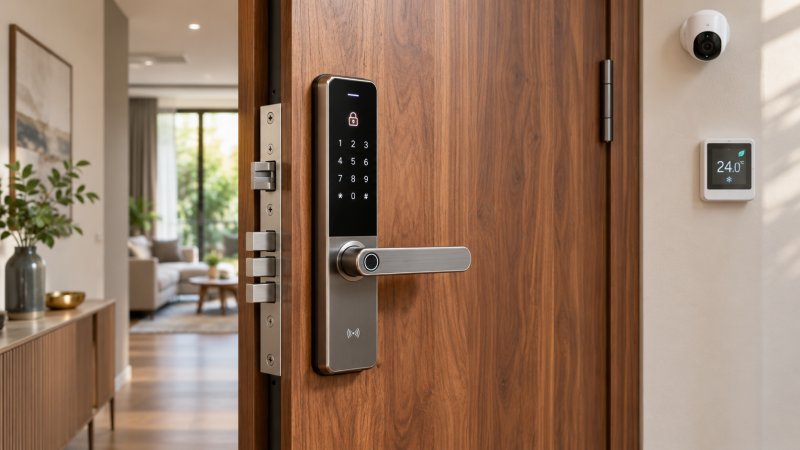
The most useful residential smart security locks allow individual credentials rather than one shared PIN. Individual codes, named app accounts, or separately enrolled biometric templates create clearer accountability. If a shared code is passed along or forgotten, the only safe response may be changing access for everyone. With individual credentials, the household can remove one person’s access while leaving everyone else unaffected.
- How many people require daily, independent entry?
- Will children, elderly residents, or people with limited hand mobility use the lock?
- Do visitors need access only at certain times or on certain days?
- Will the household need a record of entries, or only the ability to manage permissions?
- Who has authority to add, edit, and delete users?
That final point deserves attention. Many app-connected locks designate one owner or administrator account. Confirm what happens if that person changes phones, loses account access, moves out, or is unavailable during an urgent situation. A shared household should have a deliberate process for ownership transfer and recovery rather than relying on one resident’s personal login.
Choose Authentication for Real Household Behavior
Most smart locks offer several unlock methods: PIN codes, fingerprints, cards or fobs, mobile applications, physical keys, and sometimes facial or other biometric recognition. More methods do not automatically mean better protection. The practical aim is to provide a secure primary method for each regular user, plus sensible backup methods for exceptions.
Fingerprint access is attractive because residents do not need to carry anything. It can work well for adults who use the lock frequently, but fingerprint performance should be tested against the household’s conditions. Wet hands, dry skin, dirt from gardening or manual work, small children’s changing fingerprints, and an improperly positioned reader can all affect usability. A fingerprint reader should therefore be part of a multi-method setup, not the only route into the home.
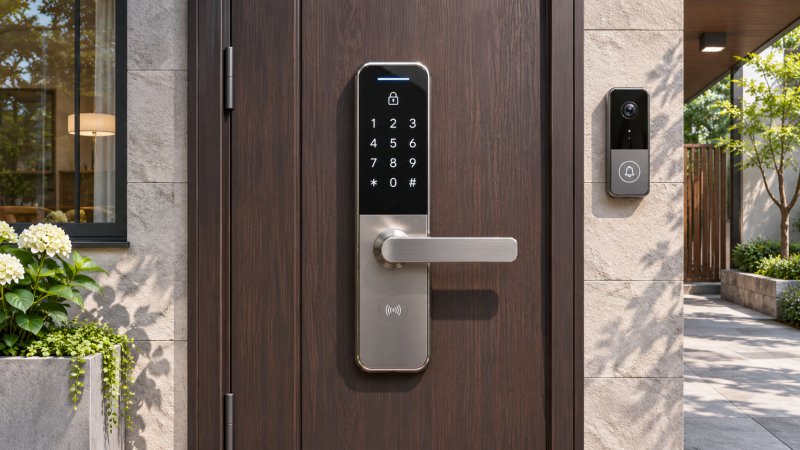
Keypads are often the most flexible option for caregivers and temporary visitors because access codes can be assigned without issuing a physical key. Look for the ability to create time-limited, recurring, or one-time codes where the household genuinely needs them. It is also worth checking how the lock prevents casual observation of a PIN. Some models use random-number screens or other input protections, but the details vary. A long, unique code and a rule against sharing it remain more important than a decorative feature list.
Mobile credentials suit users who already keep a charged phone with them. However, app access depends on account security, phone security, and sometimes the presence of a bridge, hub, or internet connection. Ask whether a phone can unlock the door locally through Bluetooth, remotely through an internet-connected gateway, or both. Those are different capabilities with different failure points.
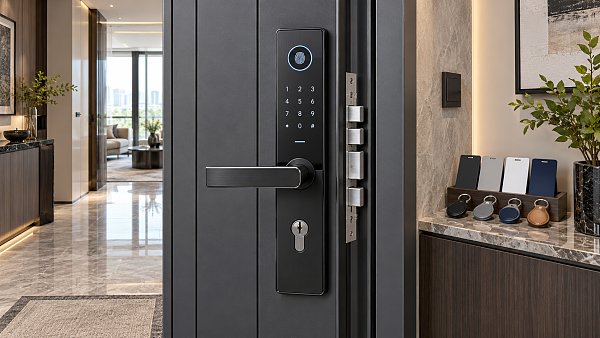
A mechanical key is still relevant. It may be an emergency fallback, a preferred option for one resident, or a concern if the keyway becomes the weakest part of an otherwise sophisticated lock. If the design retains a traditional cylinder, assess the cylinder and escutcheon as seriously as the electronic functions. Physical security specialists regularly emphasize that a smart exterior panel cannot compensate for a weak cylinder, poorly protected lock case, loose strike plate, or unsuitable door frame.
Permission Controls Matter More Than a Large User Capacity
A product specification may state that it supports many fingerprints, PINs, or cards. That number is only useful if the lock lets the household manage those credentials clearly. For a busy home, the better question is: can you see which credential belongs to whom, what it can do, and when it was last used?
Activity logs can be useful, especially where temporary access is common, but they should be treated realistically. A log records events reported by the lock; it does not replace situational awareness, a door camera where appropriate, or good household communication. Also check whether logs are stored locally, in an app, or through a cloud service, and whether access to those records is protected by strong account controls.
Do Not Treat Connectivity as the Lock’s Core Security
Wi-Fi, Bluetooth, Zigbee, Thread, Matter-compatible ecosystems, and proprietary hubs can all appear in the residential market. The right option depends less on trend and more on how the home is operated. Bluetooth may be enough for local phone control and setup. A hub or bridge may be necessary for remote monitoring, remote code management, or integration with a broader smart-home system.
Remote unlocking should be used carefully. It can be helpful when a family member is locked out or a visitor arrives unexpectedly, but it also creates an action that should not be casually available to every app user. Check whether the administrator can separate permission to manage users from permission to remotely unlock the door. If that separation is unavailable, consider whether all account holders truly need full control.
Account protection is part of the door security. Use unique passwords, enable multi-factor authentication if the provider supports it, remove old phones and former users promptly, and pay attention to firmware updates. Buyers should ask how updates are delivered, whether the lock continues operating during a connectivity outage, and what functions stop if a vendor’s cloud service is unavailable. The door must still open and lock safely when the home network does not cooperate.
Inspect the Door, Lock Body, and Installation Constraints
Compatibility is where many otherwise good smart-lock purchases become frustrating. Identify the existing lock type: deadbolt, mortise lock, multipoint mechanism, euro-profile cylinder arrangement, rim lock, or another regional configuration. Measure door thickness, backset, bore hole dimensions, handing, clearance around the frame, and the relationship between the handle and lock. For multipoint and protective doors, a residential retrofit may require a lock designed for that mechanism rather than a standard deadbolt replacement.
The door itself also affects the result. A warped door, poorly aligned strike, loose hinges, or weak frame can cause a motorized lock to struggle, drain batteries faster, or fail to latch consistently. Before blaming the electronics, verify that the mechanical bolt moves smoothly with the door open and closed. A qualified installer can identify alignment issues that are invisible in product photos.
For homes where forced-entry risk is a concern, look beyond the smart-lock brand. Consider the strength of the lock case, bolt engagement, cylinder protection, strike reinforcement, door construction, and frame anchoring. Requirements and test standards differ by market and product category, so any claimed compliance should be reviewed against the supplier’s current documentation and local building or insurance requirements. A certification label should be relevant to the installed configuration, not simply attached to a related product line.
Plan for Battery Failure, Emergencies, and Life After Installation
Every electronic lock needs an ordinary failure plan. Check the battery type, low-battery warnings, expected replacement procedure, and whether external emergency power is available. More importantly, decide who keeps backup access and where it is stored. Hiding a physical key near the door may defeat the security objective; leaving the only backup with a person who travels frequently may be equally impractical.
Fire and emergency egress deserve separate attention. A lock should allow occupants to exit safely from inside in line with local requirements and the door’s intended use. Do not assume that a feature designed for entry convenience addresses life-safety obligations. This is particularly important in residences with children, older adults, or users who may need to leave quickly without a phone, code, or biometric check.
Maintenance is modest but not optional. Keep the reader clean, inspect mounting screws and door alignment, update software when appropriate, review old credentials, and replace batteries before they are depleted. When a tenant, caregiver, domestic worker, or former partner no longer needs access, remove the credential immediately rather than waiting for the next routine review.
A Better Final Decision: Test the Whole Access Journey
Before committing, walk through ordinary and awkward moments: a child returning from school, a resident with groceries and wet hands, a carer arriving during a network outage, a phone left inside, a battery warning at night, and a guest whose access should end after the weekend. If the proposed lock handles these situations without granting excessive control or creating a lockout risk, it is likely a good fit.
The most suitable residential smart security locks are not necessarily those with the longest feature list. They are the ones whose credentials, mechanical design, backup access, and installation requirements match the household’s real routines. For more complex decisions, especially involving upgraded doors, mechanical cylinders, biometric access, or connected building systems, SHPS provides a useful industry perspective by linking digital access features with the physical security engineering behind the door.
Confirm the exact door configuration, user-management rules, emergency access method, connectivity dependency, and applicable local requirements before installation. Those details determine whether a smart lock remains a daily convenience or becomes another household problem to manage.
Have questions about this sector analysis, or seeking best practices specific to your niche? Drop us a line below and let the senior consultants at MHLS assist you.
We respect your privacy. Your information is strictly confidential.
Recommended News
 Physical Security System Engineering: From Risk Assessment to System DesignUnmanned Terminal FellowExplore physical security system engineering, from risk assessment to integrated design, procurement and testing. Build a safer, more resilient facility.
 Apple Home Collection Smart Lock and Other Accessories Open for Preorder November 13Biometric Auth ScientistApple Home Collection preorders open November 13, 2026. Explore the LG smart lock’s Matter and Aliro support and what buyers should verify before ordering.
 Choosing Servo-Driven Flap Barriers: Throughput, Safety and Access ControlAccess Control StrategistServo-driven flap barriers can balance throughput, safety and access control. Discover how to compare lanes, test performance and choose with confidence.
 Parcel Locker Network Pricing: Setup Costs, Fees and Contract TermsUnmanned Terminal FellowCompare parcel locker networks pricing, from setup costs and recurring fees to contract terms. Discover hidden charges and choose the right model.
 JR East Plans UWB Walk-Through Gates at 40 Stations in Spring 2028Access Control StrategistJR East plans UWB walk-through gates at 40 stations in spring 2028. Explore the rollout timeline and what suppliers should watch.
 Bank Vault Security Standards: UL and EN Ratings ExplainedVault Structural ArchitectExplore bank vault security standards and learn how UL 608 classes and EN 1143-1 grades differ, what they test, and how to verify certification before you buy.
 Mechanical Lock Hardware Prices: What Buyers Should Budget for Bulk OrdersMr. Gideon CrossMechanical lock hardware price is just the starting point. Discover what drives bulk-order costs and how to compare supplier quotes with confidence.
 IndexBox Forecasts Steady Global Security Keypad Market Growth Through 2035Dr. Valerius ThorneGlobal security keypad market growth is forecast at 3.3% annually through 2035. Explore the smart home and replacement trends shaping demand.
 Choosing an Infrared Safety Sensors Manufacturer: What Buyers Should CheckUnmanned Terminal FellowChoosing an infrared safety sensors manufacturer? Compare safety evidence, integration, environmental performance and lifecycle costs before you buy.
 Choosing a Security Material Testing Service: What to Check for Lock and Safe MaterialsProf. Elara SterlingChoose a security material testing service with confidence. Learn what to check for lock and safe materials, from attack methods and accreditation to reliable reports.
 How Precision Anti-Pick Lock Cylinders Resist ManipulationSecurity Metallurgy ExpertDiscover how precision anti-pick lock technology resists manipulation, and learn what to check when comparing security features, test evidence, and everyday reliability.
 Dermalog Joins NIST FastCAP Program for Contactless Fingerprint TestingProf. Elara SterlingDermalog joins the NIST FastCAP program for contactless fingerprint testing. Discover what this means for biometric identification and digital identity.